Welcome back to the third entry to the still unnamed game we are working on for the GameBoy jam! Today we will go over mostly stream additions as I was busy implementing stuff over there.
Throwing items away and rules
Now that we can pick up items, it is time to throw them away into the endless abyss under the cave of the dragon. This in itself, is not a very tricky thing to implement. Designate a zone for the hole, draw a hole there and if an item is over it, let it fall. But what does it mean for things to fall?
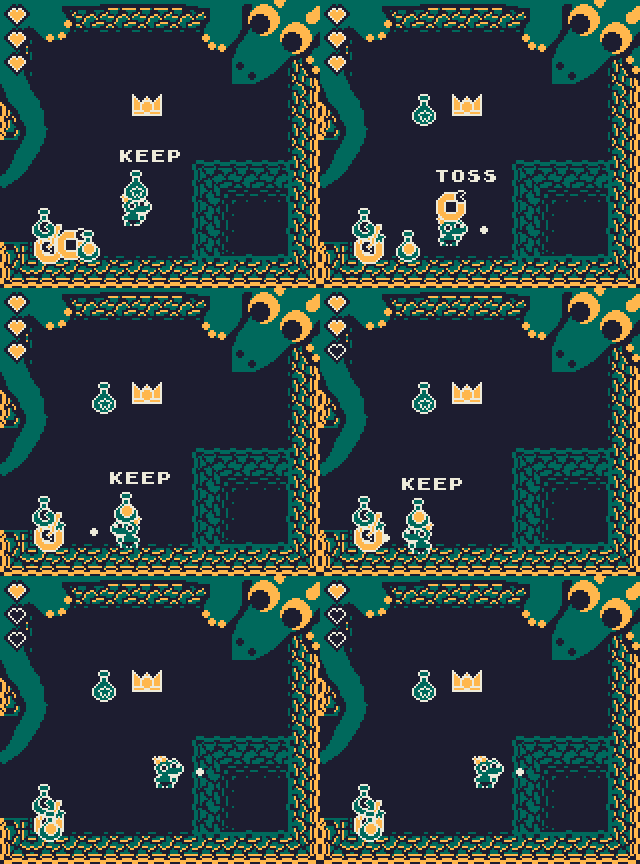
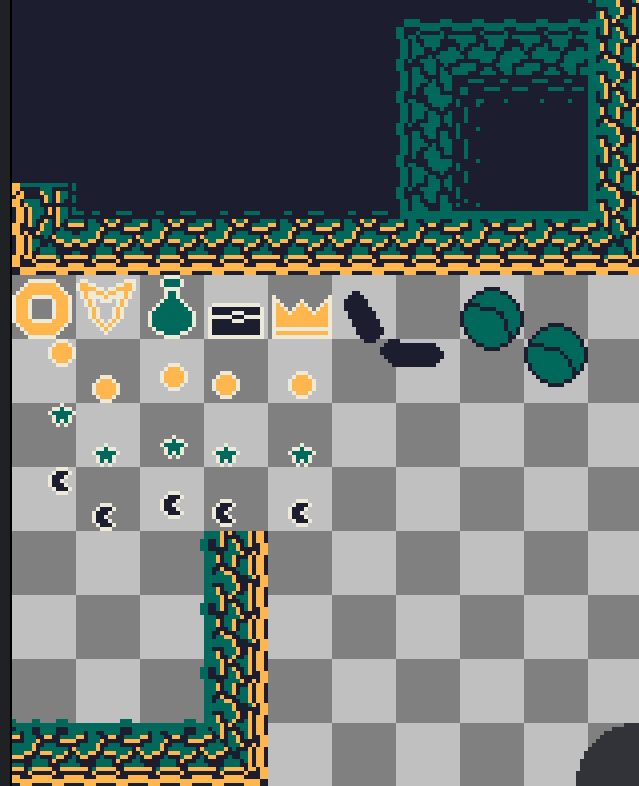
For this effect, we need two things, the hole and an overlay. The hole itself is easy to understand and draw intot he static play area, the overlay though might puzzle some of you. You need one because the items are drawn over the map, so if you just move them downwards they would appear over the walls of the cave as they exit downwards. For this, we copy part of the cave and draw it over the items! This will create the illusion of them falling away into the hole. This overlay corner just lives a bit away on the spritesheet (ignore the possible spoilers) and is waiting for the eventual call in the draw order.
Now that we have a good way to chuck items away, time to set up the rules. The main gameplay is gonna be about keeping or throwing items away, based on what the dragon wants to keep or not. For this I’ll send you over to the actual code of the game, but don’t be scared, this part is very well commented as we were brainstorming through the solutionon on stream, here is the detailed rule setup.
In short, this comes down to 2 things. A table, which holds which item with which mark is allowed to be kept, and 3 function that can set those. One to set an item (with all its marks), one to set a mark (with every item) and what that sets a specific item with a specific mark. These rules are packed into an array for easier reading which is needed for the third part of this.
Second though is checking if an item is actually allowed to be kept or thrown away! With the rule table, this is a very easy check. A simple
if treasureHandler.is_treasure_allowed(treasure) then

-- the nice thing with rule table, is that checking if item is allowed
-- is very simple
function TreasureHandler.is_treasure_allowed(t_item)
    return TREASURE_RULE_TABLE[t_item.type][t_item.mark]
end
call paired with the location will tell you if the item can be placed or not. This simply just calles into the rule table and returns the boolean in there.
The third part
Now all we need to make this actually visible for the player. Originally I wanted a static element on the screen all the time, but in the end I decided to have the dragon tell it to you, if you are close enough. This way your memory also comes into play as you kinda have to remember rules beacuse always going over to the dragon will not be feasable. Ignore the debug text over the players head, it is there so we can actually know and test faster :D
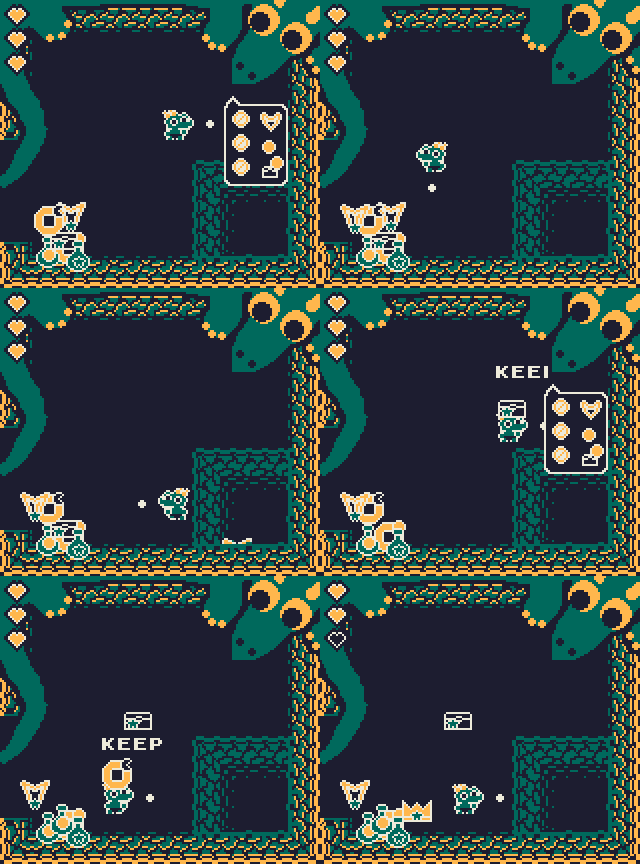
Drawing the rules is a bit tricky as we need to move stuff around, and figure out spacing, but not super complicated:
function draw_rules()
    -- draw upper part of speech bubble
    gfx.sspr(112, 16, 32, 16, 112, 48)
    --calc the length you need for the rules
    local rule_area = #TREASURE_RULES*12
    -- inside rectangle
    gfx.rect_fill(112, 56, 32, rule_area-2, COLOR.WHITE)
    gfx.rect_fill(113, 56, 30, rule_area, COLOR.BLUE)
    -- draw end piece
    gfx.sspr(112, 32, 32, 12, 112, 48+rule_area)
    -- need an offset so each rule is under the prev one
    local rule_offset = 0
    -- start level
    local y_level = 50
    for k,v in pairs(TREASURE_RULES) do
        -- draw the deny symbol
        gfx.spr(16, 114, y_level+rule_offset)
        if v[3] == RULE_TYPE.ITEM then
            -- draw the item
            gfx.spr(10 + v[1], 130, y_level+rule_offset)
        elseif v[3] == RULE_TYPE.MARK then
            -- draw the mark (needs a little offset so it is in middle)
            gfx.spr(20 + v[1], 122, y_level+rule_offset+8)
        else
            -- draw item and mark
            gfx.spr(10 + v[1][1], 130, y_level+rule_offset)
            gfx.spr(20 + v[1][2], 126, y_level+rule_offset+4)
        end
        -- give space for the next rule
        rule_offset += 12
    end
end
And this is all we need for this. Now we need to make an actual gameplay loop as we can spawn items, sort them, keep them. Letsgo!
Scenes and gameplay loop
I’m not gonna go really into this as we have done the same scene system many many times, but the tl;dr is: have one variable which holds which scene we are on (menu, game etc…), use the draw and update calls for the respective scene.
if SCENE == SCENES.INTRO then
    update_intro()
elseif SCENE == SCENES.MENU then
    update_menu()
elseif SCENE == SCENES.GAME then
    update_game()
elseif SCENE == SCENES.WON or SCENE == SCENES.LOST then
    update_won_or_lost()
end
With this we can swap to a new one, just by setting the variable. So, if we run out of health, lets go over to the lost scene:
 if self.health <= 0 then
    SCENE = SCENES.LOST
end

-- or to won if we have sorted enough items.
if self.correctSorted == 1 then
    if #TREASURE_RULES < 6 then
        TREASURE_HANDLER:create_new_rule()
        self.correctSorted = 0
    else
        SCENE = SCENES.WON
    end
end
For quicker testing this is set up where you need to sort 1 item 6 times to win, this will be probably more of 10 items 6 times in the final game, but switching to the won scene and back to menu is just as easy. Set the scene with a button press!
function update_won_or_lost()
    if input.pressed(input.BTN1) then
        SCENE = SCENES.MENU
    end
end
One last thing we need is a reset function. Now, you can do this many different ways, I have gone the easy route. Basically you want a function to restart your game, reset everything before a new play starts.
function new_game()
    PLAYER.health = 3
    PLAYER.correctSorted = 0
    PLAYER.x = PLAYER_START_POS.x
    PLAYER.y = PLAYER_START_POS.y
    PLAYER.itemInHand = false
    PARTICLES = {}
    TREASURE_HANDLER.treasures = {}
    TREASURE_RULES = {}
    TREASURE_RULE_TABLE = {
        { true, true, true },
        { true, true, true },
        { true, true, true },
        { true, true, true },
        { true, true, true }
    }
    DRAGON_TEXT_TIMER = 0
    DRAGON_TEXT = ""
    TREASURE_HANDLER:create_new_rule()
    TREASURE_HANDLER:spawn_item()
    TREASURE_HANDLER:spawn_item()
end
That is all. Now we have a loop. Intro -> Menu -> Game -> Won/Lost -> Menu -> Game … etc. Game done, ship it. Just joking, now comes the hard part. Polishing and juice.
The hard part
These last two things take up most of the development in smaller games. Polishing refers to fixing bugs, smoothing out gameplay experience, friction, mechanics, while juice is basically evertyhing that makes a game pop. Screenshake, particles, sound, that funny cat in the background, grass moving as you go through it, you name it.
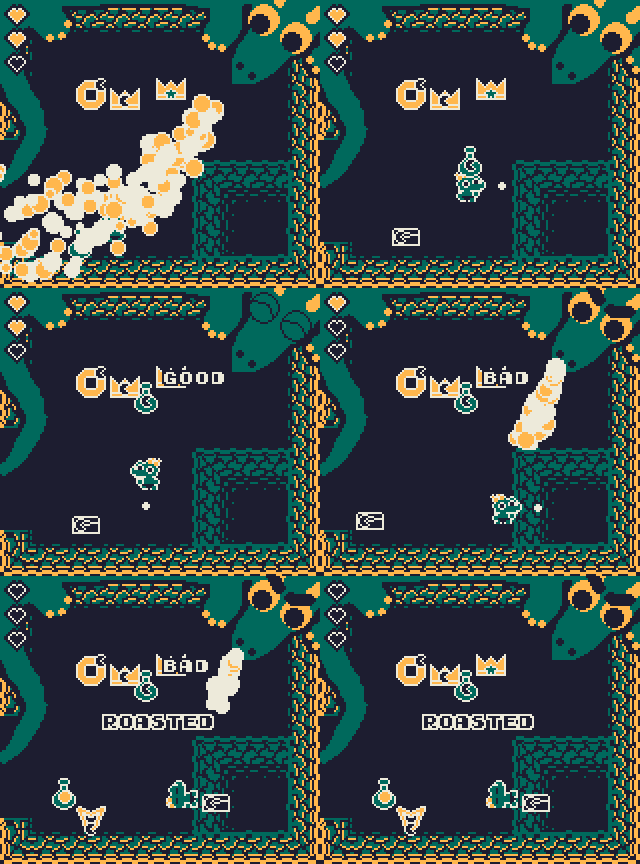
In our case the first thing that had to get better is the dragon. I wanted for the longest time for it to spew fire at the player, but the idea of making it look angry or happy came up later. This is not too complicated, just needs a little spritework, look at the angry eyebrows or the green happy eyes on the sprite sheet above! Told you it is a bit of a spoiler.
So now when the player makes a choice, we can set the result for the dragon:
 -- good item thrown away
self.health -= 1
DRAGON_TEXT = "BAD"
DRAGON_TEXT_TIMER = 60
sfx.play("wrong")

-- bad item thrown away
DRAGON_TEXT = "GOOD"
DRAGON_TEXT_TIMER = 60
self.correctSorted += 1
sfx.play("good")
And based on this we can set the happy eyes, or the grumpy face, more importantly, spit FIRE!
if DRAGON_TEXT_TIMER > 0 and DRAGON_TEXT == "BAD" then
    Fire_at_player()
end
-- and in draw do the happy eyes or the angry brows based on
-- if a good sort was made or if we have won or lost!
function draw_dragon_brows()
    if (DRAGON_TEXT == "BAD" and DRAGON_TEXT_TIMER > 0) or SCENE == SCENES.LOST then
        gfx.sspr(80, 288, 32, 32, 130, -8)
    elseif (DRAGON_TEXT == "GOOD" and DRAGON_TEXT_TIMER > 0) or SCENE == SCENES.WON then
        gfx.sspr(112, 288, 32, 32, 124, -1)
    end
end
All this will culminate in this lovely result, where the dragon is more alive than ever!
Aaaand that is the summary of the past couple of days, and now I have to go and finish the actual game before the Monday deadline! Hope you learned something cool/interesting today, and I’ll see you next time!
Till the next one, check out other posts here or on my Ko-fi (where my old stuff lives) or here where everything new resides and I’ll see you next time!
HUGE thank you for my current supporters, Csöndi, Nerdy Teachers and Fletch! Thank you from the bottom of my heart!

If you want to support my work you can do so with a price of a coffee! It really helps me find more time to do all this, and keep my hobby afloat.
Until the next article, take care, have a nice day!