Gamedev post, from Achie? What year is this??
Learning about Usagi Game Engine
Hahaaaa, welcome back to my game dev adventures! Today I’ll tell you about a little sidetrack I encountered recently, that got me back to programming a bit, even if it is not something fully new.
As a follower of PICO-8 and various adjacent game development spaces I stumbled upon Usagi a few times, but never really gave it a thought until SawwTooth shared that there is a jam coming up. I have been looking into gamejams recently (more on that in a moment) as I feel like it would be a good way to get myself back to the creation side of indie games. I’ve been in a slump with creative energy so my thought process was that a jam could help make me something quick, that doesn’t have to be perfect. Because it is a gamejam, nothing is perfect.
So Usagi (Game Engine) is a 2D game engine for making pixel art games in Lua 5.5. It features live reload, single-command cross-platform export, and a pause menu with input remapping built in.
With their technical terms out, let me tell you what I feel like it is. Imagine if PICO-8 and Löve2D had a child. You can make all the code you want, but it has its own api. You can have sprites, but they need to be on one (so far) spritesheet! Use music and sfx from wherever you want, but there is no builtin editor. To me Usagi feels like a framework, such as Löve, rather than a full engine. Interesting, isn’t it? Let’s take a look!
Setup and some issues for me
With my curiosity raised, I looked into how to setup and honestly, easy as PICO-8. You can download it from their Codeber Release Page or GitHub/Itch, extract it and there you have it. Now if you ask me you also add it to your path, so you can call it from anywhere.
Enter the directory and just type:
usagi init <projectname>
There you have it. Now you have a directory with gitignore, luarc for your lsp and a metafile containing stubs for it as well. Gram (my current code editor of choice) almost took this without any issues, except for one thing. No matter how I defined the “runtime.nonstandardSymbol” it was having a fit with operators like += so I just solved it with a simple:
---@diagnostic disable: unknown-symbol, trailing-space, lowercase-global
on top of the file. This also disables a few other language server related things, but honestly I do not care about those as I’m a rascal. Then just run enter the folder and run:
usagi dev
and you have a live reloading project. There is one thing that still confuses me, there is a State variable that you can stuff value into and it retains it over reloads, but it is causing weird errors for me, so that is a part I need to understand. Others don’t have an issue with it, so it is a user error on my side.
What to make?
With my creative powers still shackled, I looked to an old project of mine. I always planned and made Lina: Fishy Quest to be a small but fun experience with very little entry barrier on the code part. Fully commented out, so maybe some find their way into PICO-8 with it, so perfect candidate to be remade with Usagi.
I’m following the Löve2D syntax/structure, so we are creating separate files for the ‘objects’ of the game. For example (and since I can do this on this site), here is the player file!
---@diagnostic disable: unknown-symbol, trailing-space, lowercase-global
local Player = {}
local helpers = require("helpers")


function Player.new()
    local self = {
     px = 1,
        hook = {
        x = 11,
            y = State.waterline + 8,
            hooked = false
        },
        isFlipped = false,
        score = 0
    }

    function self:update(dt)
     if input.held(input.LEFT) then
            self.px -= 2
            self.hook.x -=2
            for i=0,3 do
                -- water my_part
                add_part(self.px+14, State.waterline+4, 1, math.random() - helpers.random_element_from({1, -1}), 0, helpers.random_element_from({13,7,8}), 10)
            end
            self.isFlipped = true
        end
        if input.held(input.RIGHT) then
            self.px += 2
            self.hook.x += 2
            self.isFlipped = false
            for i=0,3 do
                -- water my_part
                add_part(self.px, State.waterline+4, -1, math.random() - helpers.random_element_from({1, -1}), 0, helpers.random_element_from({13,7,8}), 10)
            end
        end

        if input.held(input.UP) and (not self.hook.hooked) then
            self.hook.y = math.max(self.hook.y-1, State.waterline)
        end

        if input.held(input.DOWN) and (not self.hook.hooked) then
            self.hook.y += 1
        end

        if (self.hook.hooked) then
            self.hook.y -= 2
            if self.hook.y <= State.waterline+2 then
                self.hook.hooked = false
                self.score += 1
            end
        end
    end

    function self:draw()
    -- lina
     local rod_mirror_offset = self.isFlipped and -20 or 0
     local lina_mirror_offset = self.isFlipped and -6 or 0
     gfx.spr_ex(4,self.px+7+lina_mirror_offset, State.waterline-2, self.isFlipped, false, 0, gfx.COLOR_TRUE_WHITE, 1)
     gfx.spr_ex(5, self.px+14+rod_mirror_offset, State.waterline-3, self.isFlipped, false, 0, gfx.COLOR_TRUE_WHITE, 1)
     gfx.sspr_ex( 8, 1, 16, 9, self.px, State.waterline+1, 16, 8, self.isFlipped, false, 0, gfx.COLOR_TRUE_WHITE, 1)
     local fishing_line_offset = self.isFlipped and -8 or 0
     gfx.line(self.px+22+rod_mirror_offset+fishing_line_offset, State.waterline-1, self.hook.x, self.hook.y, 7)
        gfx.spr(6, self.hook.x, self.hook.y)
    end


    return self
end

return Player
With this, I will just require this into the main.lua and call a:
PLAYER = player_handler.new()
and bam, we have a player on the board, once we add PLAYER:update(dt) and PLAYER:draw(dt) into the respective root functions of _update and _draw.
In a similar way I refactored my fishes and created a new handler file that handles all the fish creation, deletion and logic, other than pls move and pls draw.
function self:update(dt)
        self.spawn_cooldown = math.max(0, self.spawn_cooldown-1)
        if (self.fishes ~= nil) and (#self.fishes < 10) and (self.spawn_cooldown == 0) then
            local leftFish = math.random() > 0.5
            local startPoint = leftFish and 0 or 160
            local startSpeed = leftFish and 0.4 or -0.4
            local f = fish.new(startPoint, math.random(State.waterline + 10, 108), startSpeed, 0, 1, not leftFish)
            table.insert(self.fishes, f)
            self.spawn_cooldown = FISH_SPAWN_COOLDOWN
        end

        for k,fishy in pairs(self.fishes) do
            fishy:update()
            if (fishy.x > 170) or (fishy.x < -8) then
                helpers.remove_element_from_table(self.fishes, fishy)
            end
            if (fishy.y < State.waterline+10) then
                helpers.remove_element_from_table(self.fishes, fishy)
            end

            if (not fishy.hooked) and helpers.collide(PLAYER.hook, fishy)
                and (not PLAYER.hook.hooked) then
                fishy.hooked = true
                PLAYER.hook.hooked = true
            end
        end
    end
With a small AABB collision check we can already fish up the fish and score our points! Next time, we will look into handling states and more fish and junk to fish up from the lake!
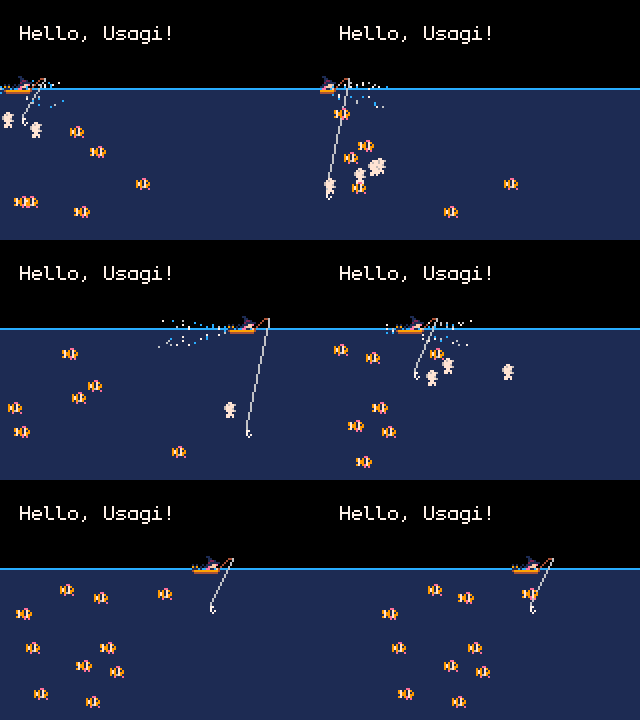
And basically that is all I have for you today, a bit quick, a bit rambly, but atm that is my development process. Quickly jump in and out and try to create something!
HUGE thank you for my current supporters, Csöndi, Nerdy Teachers and Fletch! Thank you from the bottom of my heart!
If you want to support my work you can do so with a price of a coffee! It really helps me find more time to do all this, and keep my hobby afloat.
Until the next article, take care, have a nice day!